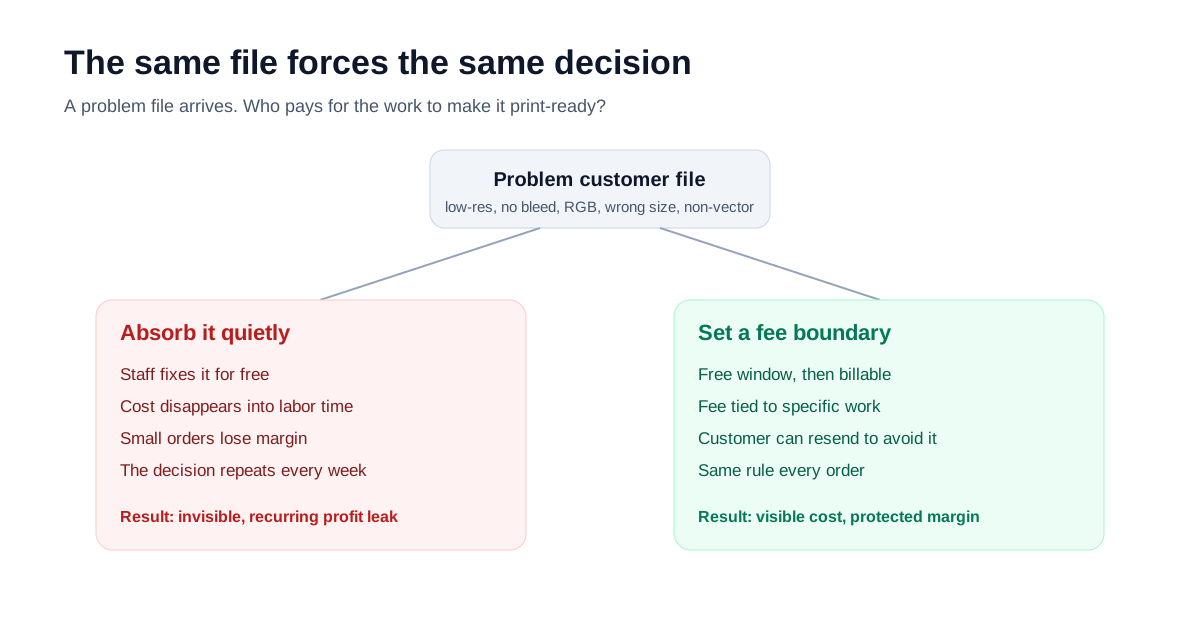
Definition
What a file handling fee actually covers
A file handling fee pays for the prepress labor that turns a problem file into a print-ready one. It is not a design fee for creating new artwork, and it is not an imprint setup fee for screens, dies, or digitized stitch files. Keeping those separate makes the charge easier to defend.
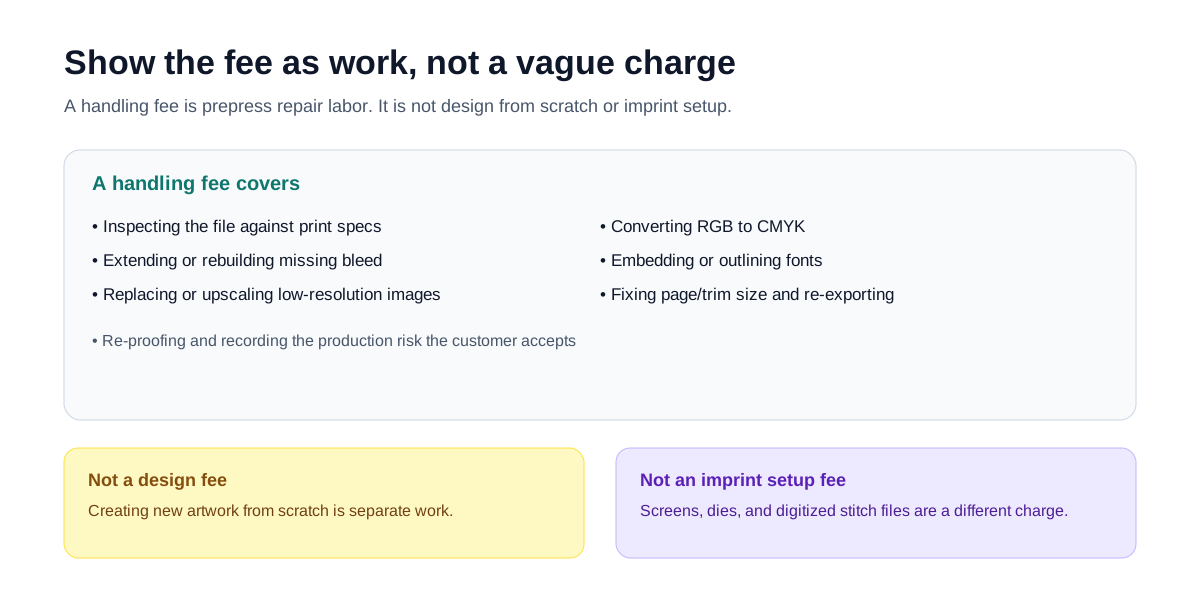
- Inspecting the file against print specs
- Extending or rebuilding missing bleed
- Replacing or upscaling low-resolution images
- Converting RGB artwork to CMYK
- Embedding or outlining fonts
- Fixing page or trim size and re-exporting
- Re-proofing and recording accepted risk
Public examples show the pattern. Some shops publish a one-time file setup fee for files that need formatting or optimization before printing. Others bill artwork rebuilds separately when a customer supplies a flattened or RGB file that has to be reconstructed. A logo setup fee, by contrast, covers checking and converting the logo for a specific imprint method, which is a different kind of charge.
The real question
You may already be paying for it
The question is rarely whether the work has a cost. It does. The question is whether that cost is visible. When staff fix files for free, the time does not disappear, it just gets absorbed into labor hours and quietly drains margin, especially on small orders.
As a wage baseline, the U.S. Bureau of Labor Statistics listed the May 2023 mean hourly wage for prepress technicians and workers at $22.38. That is only a floor. Once you add overhead, rush pressure, and the opportunity cost of pulling skilled staff off other jobs, the real value of that time is higher. Trade coverage of prepress profitability makes the same point: unpaid file work is one of the clearest places a shop leaks profit.
Before deciding on a fee, it helps to size the leak. As an illustration, not a measured figure: if a dozen problem files a week each took fifteen extra minutes, that would be roughly thirteen hours a month of prepress time before any reprint or delay cost. Use the calculator with your own numbers to get a figure you can trust.
When to charge
When you should charge
The fix needs real prepress labor
Rebuilding bleed, replacing low-resolution images, redrawing a logo, or converting and re-exporting a file is production work, not a courtesy check.
The same customer repeats it
A one-time issue is goodwill. A customer who sends unusable files on every order is a recurring cost that belongs in the quote.
A rush job jumps the queue
Fixing a file under deadline pressure pulls staff off other orders. That priority has a value worth pricing.
Repair cost rivals the order value
When the time to fix the file approaches the margin on the job, free repair turns the order into a loss.
A practical workflow some shops use: preflight the file, list the problems, ask for a press-quality resend, and charge a prepress fee only if the customer cannot or will not fix it. That keeps the fee tied to actual work rather than punishing every imperfect file.
When not to charge
When you probably should not
A fee that gets applied to everything trains customers to expect friction. A few cases are usually better absorbed. Print practitioners describe the same instinct: within reason they do not charge, and only add a small fee when the files are consistently bad and the customer has already been shown how to send better ones.
It's a few-minute check
Confirming size or resolution and making a quick adjustment is cheap goodwill that keeps the order moving.
You're investing in the relationship
A first order from a promising customer can be worth absorbing once, as long as it does not become the default.
The mistake was on your side
If your shop did not state the spec clearly, the rework is the cost of fixing your own intake, not a customer fee.
The fee would cost you the order
In a competitive quote where the fix is small, a separate fee can lose a job worth more than the time saved.
How much
How much to charge
There is no single right number. What matters more is choosing a model you can apply the same way on every order, then anchoring it to your own prepress labor cost rather than copying another shop blindly.
As a reference point, several shops publish their file and artwork prep fees openly. The numbers cluster around a $25 to $40 one-time charge for getting a supplied file production-ready, with redraw or vectorization work billed at roughly $40 per hour. These are real published rates, not a recommendation; use them to sanity-check your own number against your labor cost and market.
| Shop | Fee name | Published price | What it covers |
|---|---|---|---|
| In Motion Designs | Artwork setup fee | $25 one-time | Get supplied art ready for printing |
| intheclouds | Art setup fee | $25 one-time | Prep customer art for production |
| Ken's Custom Tees | Vector artwork | From $25 / logo | Computer vector conversion per piece |
| Ken's Custom Tees | Redraw / vectorize | $40 / hour | Hand-drawn or full-color vector rebuild |
| Custom Print Works | File setup fee | $40 one-time | Pre-press check, vectorization, cut-path setup |
Published rates collected from public shop pages in 2026. Prices change; treat them as a range, not a benchmark to copy.
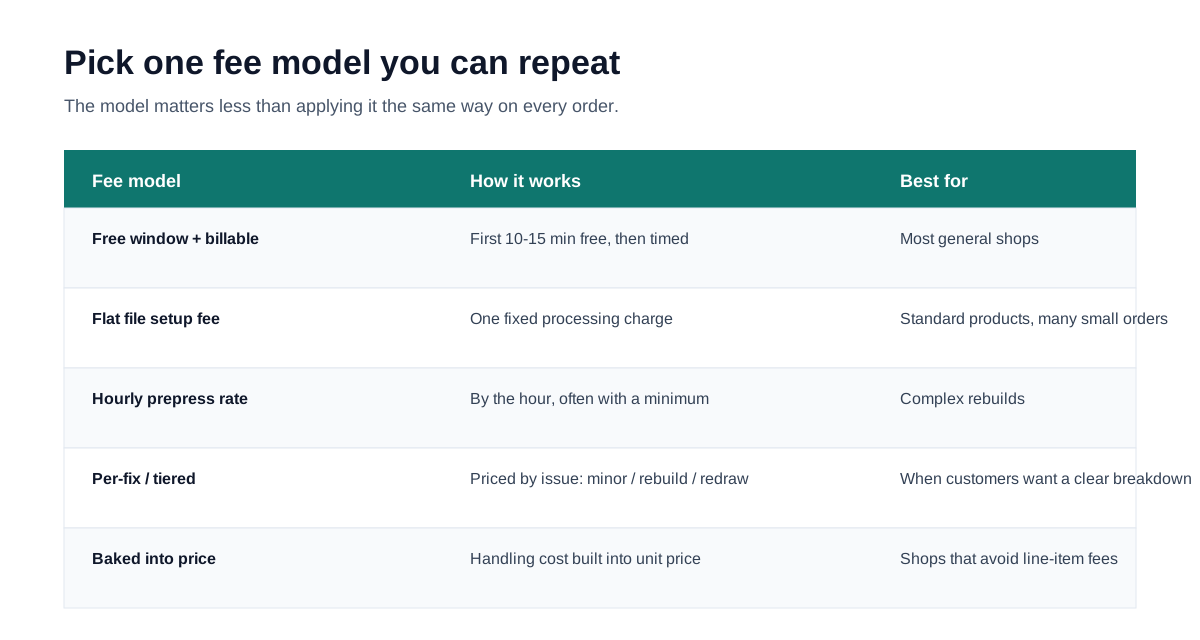
| Fee model | How it works | Best for |
|---|---|---|
| Free window + billable after | First 10-15 minutes free, then timed | Most general shops |
| Flat file setup fee | One fixed processing charge | Standard products, many small orders |
| Hourly prepress rate | By the hour, often with a minimum | Complex rebuilds |
| Per-fix / tiered | Priced by issue: minor, rebuild, redraw | When customers want a breakdown |
| Baked into price | Handling cost built into the unit price | Shops that avoid line-item fees |
Explanation
How to explain the fee so customers accept it
Whether a fee sticks depends less on the amount than on how it is framed. The goal is to make the charge about the file, not about the customer.
Tie the fee to the work
Name the task: rebuild bleed, replace a 72 dpi image, outline fonts, re-export to CMYK. A specific task is easier to accept than a vague handling charge.
Use the file check as evidence
A visible low-resolution result or a missing-bleed note turns the fee into a fact about the file rather than a judgment about the customer.
Disclose it before the order
Put the fee rule in the quote or file submission requirements so it is never a surprise added after the fact.
Offer a free alternative
Let the customer avoid the fee by resending a print-ready file. The fee then reads as a choice, not a penalty.
The same logic shows up in public proof disclaimers and customer artwork policies: shops state in advance that customer-supplied files are printed as provided, that approved proofs carry responsibility, and that screen color and low-resolution images have known limits. Disclosing the boundary before production is what makes a later fee or return defensible.
Decision rule
A simple rule beats a per-order guess
Once the same judgment repeats every week, it should stop being a one-off call. Route each problem file through the same four questions so staff give customers a consistent answer.
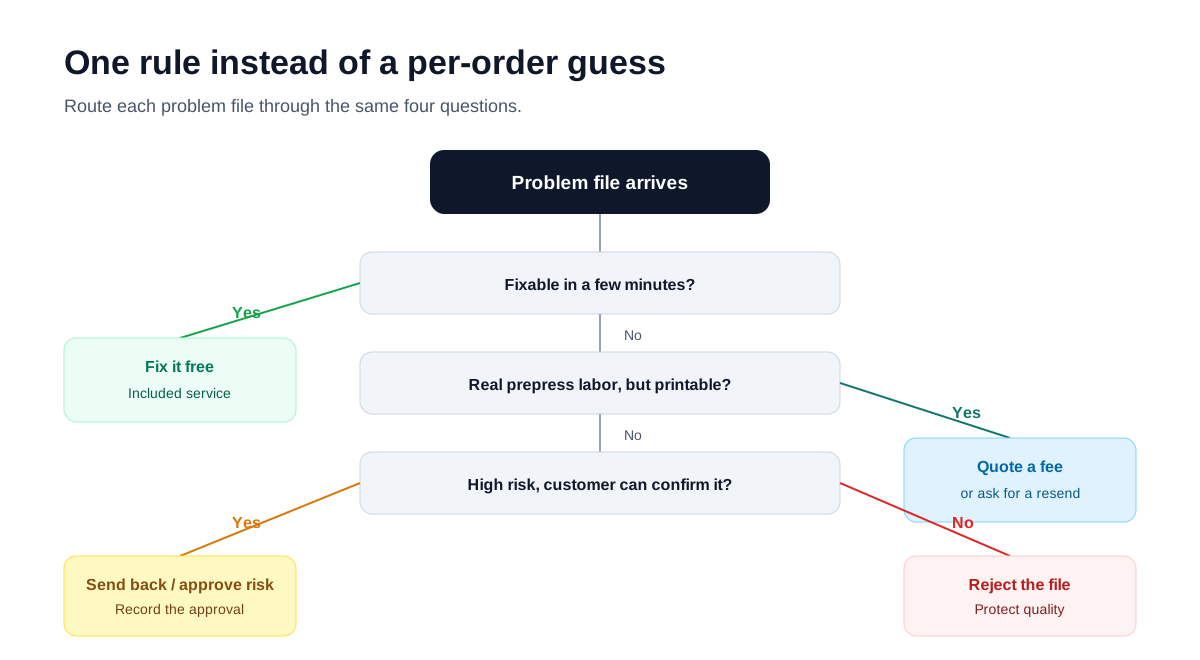
| File situation | Action | Why |
|---|---|---|
| Fixable in a few minutes | Fix it free | Included service keeps the order moving |
| Real prepress labor, still printable | Quote a fee or ask for a resend | The work gets paid for or the customer fixes it |
| High risk, customer can confirm | Send back or get risk approval | Record what the customer accepted |
| High risk, no way to confirm | Reject the file | Protect quality and your reputation |
Workflow direction
Repeated fee decisions point toward a workflow
If you are making the charge-or-absorb call several times a week, the answer is not a better one-off judgment. It is a standard process: consistent file checks, customer-readable issue reports, a clear line between included service and billable repair, and a record of what the customer approved.
That is the direction PrepressKit is testing: start with visible file checks and cost awareness, then use real workflow signals to prioritize PDF readiness, issue reports, repair suggestions, and approval records.
Sources
Research basis
These sources support the file fee examples, rebuild billing boundaries, prepress labor baseline, proof responsibility, and customer artwork policies. Reddit threads are treated as field signals rather than statistical proof.